Jump to content


Photo

Default profile picture not available anymore, messing up overviews


  • Please log in to reply
29 replies to this topic

#1 Beri

Beri
  • Member

  • 17,265 posts
  • Joined: January 14

Posted 02 December 2025 - 09:41

I have seen it being discussed in some Threads, yet no dedicated Thread on this matter exists yet on the Feedback. Hence this one.


Anywho, since a while the default profile pictures, the blue/grey-ish person silouette, seem to be non existant at its base URL:

i1.wp.com/forums.autosport.com/public/style_images/Theo/profile/default_large.png?ssl=1


This causes the various people who do not have customized profile pictures, to mess up the various Thread as well as Forum overviews. As seen below.
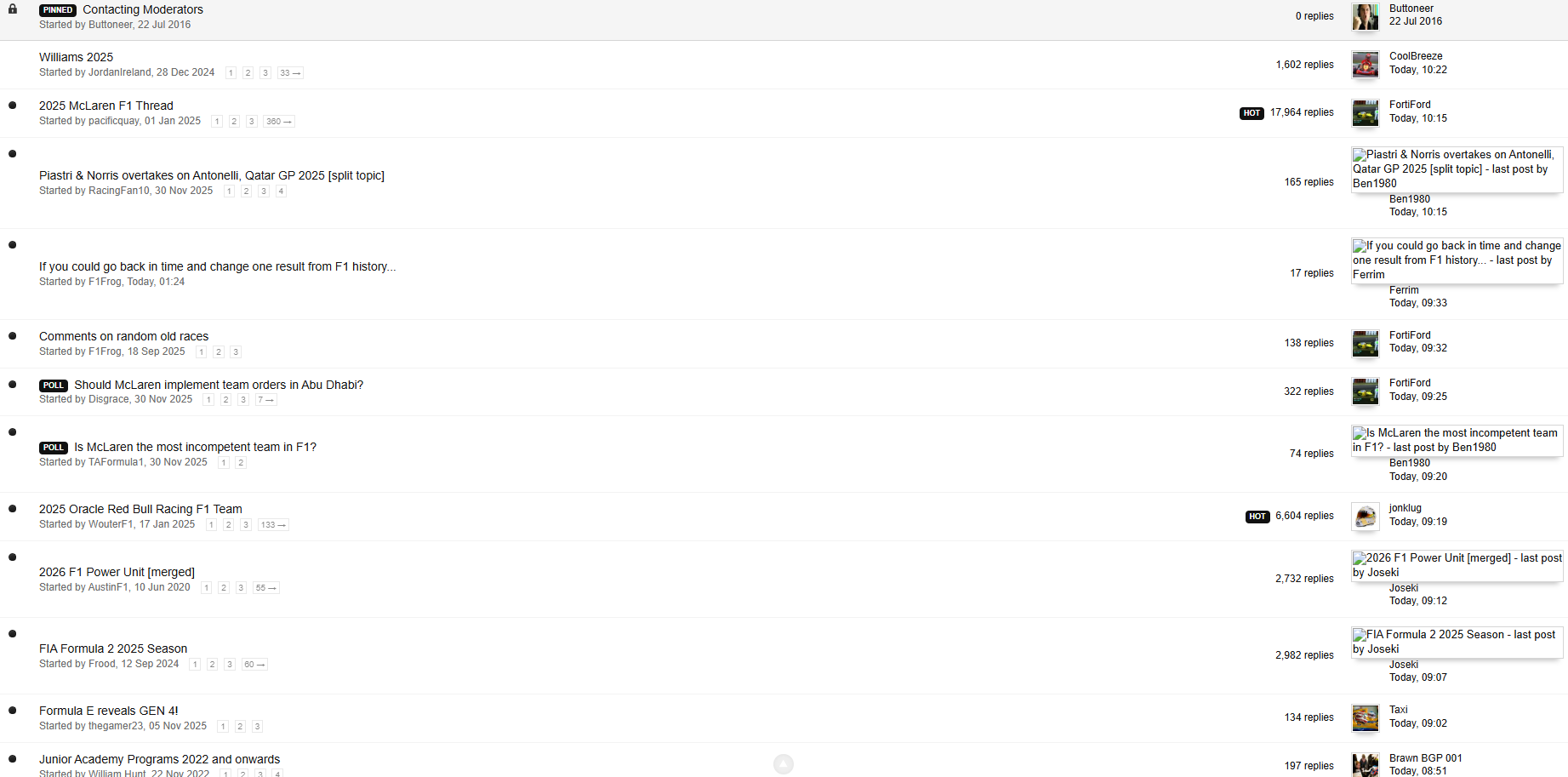
 

1.png


I find this quite annoying aesthetically as well as the fact that this is also an issue as it does not show as many Thread titles as usual. This is particularly annoying when browsing on my phone without the mobile theme. Which is something I always do as the mobile theme does not meet the needs that the standard theme does offer.


Can this be fixed? Thanks!


Edited by Beri, 02 December 2025 - 09:42.


Advertisement

#2 YoungGun

YoungGun
  • Member

  • 33,190 posts
  • Joined: January 10

Posted 02 December 2025 - 10:13

See Post Images thread, it was raised sometime ago.  Brackets suggestion works if the gate keepers feel it's not a priority fix.


Edited by YoungGun, 02 December 2025 - 10:22.


#3 Beri

Beri
  • Member

  • 17,265 posts
  • Joined: January 14

Posted 02 December 2025 - 11:14

I did link it already. But as said; no dedicated thread yet. So that's why I started this one. So perhaps the devs notice the issue now.

#4 YoungGun

YoungGun
  • Member

  • 33,190 posts
  • Joined: January 10

Posted 05 December 2025 - 11:45

As at this post all's good for me.  :up:


Edited by YoungGun, 05 December 2025 - 11:46.


#5 steferrari

steferrari
  • Member

  • 1,750 posts
  • Joined: October 09

Posted 15 December 2025 - 19:47

Yeah, I've noticed the same thing, I was thinking to open a thread too but then saw your one.

It's definitely annoying, it messes up the forum's interface like you said.


#6 Otaku

Otaku
  • Member

  • 2,088 posts
  • Joined: March 11

Posted 24 January 2026 - 22:07

A month's gone by and it's still broken


#7 Vitesse2

Vitesse2
  • Administrator

  • 46,281 posts
  • Joined: April 01

Posted 25 January 2026 - 09:57

A month's gone by and it's still broken

Try clearing your history and cookies. It was fixed at the end of December.


If that doesn't work, please post details of your browser and OS in this thread.


#8 Otaku

Otaku
  • Member

  • 2,088 posts
  • Joined: March 11

Posted 29 January 2026 - 18:24

Try clearing your history and cookies. It was fixed at the end of December.


If that doesn't work, please post details of your browser and OS in this thread.


Just did that, didn't change anything. Windows 10, Chrome.


image.png


Edit: just tried also on Edge and it's the same


Edited by Otaku, 29 January 2026 - 18:28.


#9 Vitesse2

Vitesse2
  • Administrator

  • 46,281 posts
  • Joined: April 01

Posted 29 January 2026 - 19:00

Very odd. Some of the ones visible on your screenshot are still there and work fine for me. I do use the Atlas theme, but switching from that to the Autosport theme didn't make any difference.


I think the problem may have had something to do with the default on some accounts being http rather than https, because it didn't affect all of them. So presumably it's something at your end which is loading a cached version. Maybe try a DNS flush?


#10 Otaku

Otaku
  • Member

  • 2,088 posts
  • Joined: March 11

Posted 29 January 2026 - 19:41

DNS flush didn't work


Edit: just tried on my laptop and it's the same, so it's not just my PC. 

On phone I see mobile version so I don't know.


Edited by Otaku, 29 January 2026 - 19:49.


#11 Vitesse2

Vitesse2
  • Administrator

  • 46,281 posts
  • Joined: April 01

Posted 29 January 2026 - 19:54

If it's on multiple machines and browsers, it could be your router cache then.


Clear Your Router History: Step-by-Step Guide


#12 Otaku

Otaku
  • Member

  • 2,088 posts
  • Joined: March 11

Posted 29 January 2026 - 20:00

Did that, I run a linux router and I cleared dns cache there too.


#13 Vitesse2

Vitesse2
  • Administrator

  • 46,281 posts
  • Joined: April 01

Posted 29 January 2026 - 20:46

Check your PMs.


#14 Vitesse2

Vitesse2
  • Administrator

  • 46,281 posts
  • Joined: April 01

Posted 31 January 2026 - 11:55

For anyone else still experiencing this, Otaku and I think we managed to nail down the reason after a bit of experimentation. It appears to be a problem at Otaku's ISP, which is failing to redirect a redundant image address properly.


#15 Beri

Beri
  • Member

  • 17,265 posts
  • Joined: January 14

Posted 03 February 2026 - 09:26

Which in it self is strange if that would be the case, considering that I am logging on via various IP's (via a VPN programme) and also various ISP's and still run into the issue at times. Work runs over a company ISP, privately I have 2 ISP's and on my mobile phone it is over 5G. And I still experience this issue on various OS versions and browsers. Work mandates Edge, Chrome was on my old phone when I opened this thread and on my new phone its Opera as well as at home I use Opera as my primary browser. The issue is not as much present as before, so I thought you guys fixed it, but it is still present none the less.


Edited by Beri, 03 February 2026 - 09:30.


#16 SophieB

SophieB
  • RC Forum Host

  • 31,156 posts
  • Joined: July 12

Posted 11 February 2026 - 08:27

Is this broken again or just me?


#17 Vitesse2

Vitesse2
  • Administrator

  • 46,281 posts
  • Joined: April 01

Posted 11 February 2026 - 09:13

Not just you! Left my computer on overnight as there was a big W11 update yesterday - and this morning it's back.


#18 SophieB

SophieB
  • RC Forum Host

  • 31,156 posts
  • Joined: July 12

Posted 11 February 2026 - 09:33

Rats. I’m viewing the board on an iPad using the safari browser but it sounds like it’s broken for all. Thanks for confirming.


#19 midgrid

midgrid
  • RC Forum Host

  • 11,765 posts
  • Joined: April 09

Posted 11 February 2026 - 10:30

Everything's OK for me on Chrome.


Advertisement

#20 Vitesse2

Vitesse2
  • Administrator

  • 46,281 posts
  • Joined: April 01

Posted 11 February 2026 - 11:26

Everything's OK for me on Chrome.

Not for me. Not working on any of my four browsers - Waterfox, Firefox, Chrome, Vivaldi. W11 Home with latest security update - KB5077181.


#21 YoungGun

YoungGun
  • Member

  • 33,190 posts
  • Joined: January 10

Posted 11 February 2026 - 12:39

Chrome, FireFox, Edge: W11 - Broken

Chrome, FireFox, Safari: MacOs Tahoe - Works


Both OS and Browsers up to date


#22 steferrari

steferrari
  • Member

  • 1,750 posts
  • Joined: October 09

Posted 22 March 2026 - 11:38

Happening again.


dxy-Eh-If.png


Edited by steferrari, 23 March 2026 - 20:10.


#23 Vitesse2

Vitesse2
  • Administrator

  • 46,281 posts
  • Joined: April 01

Posted 22 March 2026 - 13:19

It did seem to glitch briefly, but now working for me. Your image doesn't help though, as you seem to have hosted it on Imgur, which is now blocked to those of us in the UK. :) 


https://forums.autos...cked-in-the-uk/


#24 Vitesse2

Vitesse2
  • Administrator

  • 46,281 posts
  • Joined: April 01

Posted 22 March 2026 - 15:45

Looking at it again, it appears that the culprit was actually the avatar of one particular member. As an admin, I was able to delete that avatar, which seems to have fixed the display problem.


#25 steferrari

steferrari
  • Member

  • 1,750 posts
  • Joined: October 09

Posted 23 March 2026 - 20:13

Sorry about Imgur, I've changed the link.


Yeah looking at it again, it was down to the avatar of one particular user, it's ok for me too now.


Thank you!


#26 chdphd

chdphd
  • Member

  • 4,120 posts
  • Joined: October 03

Posted 22 June 2026 - 18:17

It's back. For me anyway.


#27 ArchieTech

ArchieTech
  • Member

  • 5,688 posts
  • Joined: May 15

Posted 22 June 2026 - 18:40

It's back. For me anyway.


Yes I'm also seeing the issue again.


#28 Ross Stonefeld

Ross Stonefeld
  • Member

  • 71,182 posts
  • Joined: August 99

Posted 22 June 2026 - 22:46

Me as well the past few days, thought it was just an Android issue but it's happening on PC now too.


#29 ArchieTech

ArchieTech
  • Member

  • 5,688 posts
  • Joined: May 15

Posted 21 August 2026 - 16:40

The default profile pictures had been working recently but now the problem has returned.


#30 Vitesse2

Vitesse2
  • Administrator

  • 46,281 posts
  • Joined: April 01

Posted 21 August 2026 - 17:06

The default profile pictures had been working recently but now the problem has returned.

Yes, we are aware, but as ever, this has turned up just before the weekend! It's one of several issues we will be reporting to the tech guys.